LEADS AND CRM

A CRM built for security guard companies.

EVO TrustGuard is a CRM built only for guard, EP, and patrol companies: every lead from every source in one feed, worked the same way.

Part of TrustGuard Business, $199 a month, with quotes, contracts and team members. The lead feed itself also comes with the free TrustGuard Marketplace account.

How it works

Work each lead from first call to signed contract.

Four things you do with every lead, from the phone in your pocket.

Put every lead in one feed.

Tap Create Lead and type it in, paste an email thread or a message, or upload up to 10 photos and files; AI fills in the lead and you review it before saving. Inbound Leads you buy land in the same list, My Leads, with filters, search and a star to keep a lead on top. On TrustGuard Business, a Signal Lead you add from the Signal Leads feed lands here too.
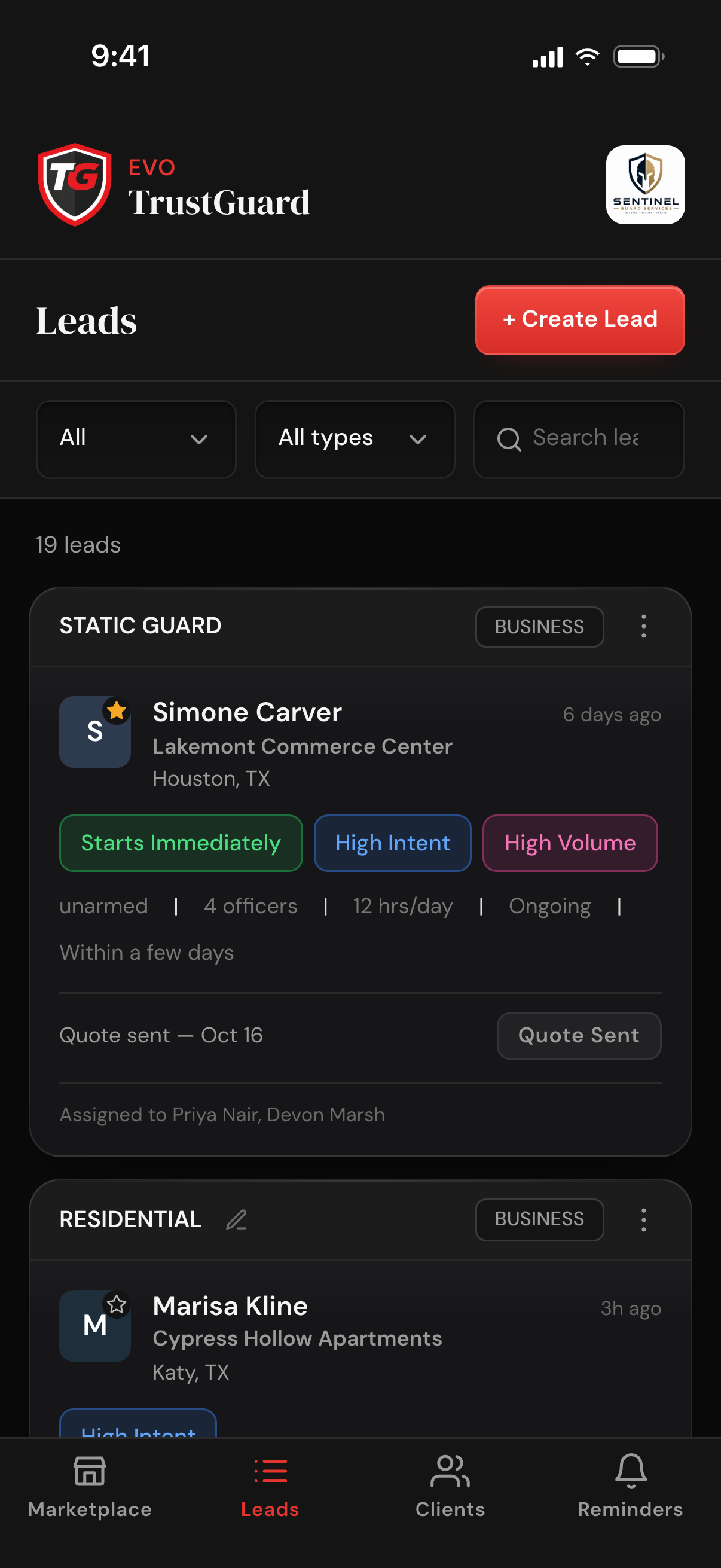
The Leads list with a Create Lead button, status and type filters, a search box and a lead count; the starred top lead is tagged Starts Immediately, High Intent and High Volume and shows its job details, a Quote sent line and the two team members it is assigned to

Call, email or text from the lead.

Call and Text open your phone's dialer and text app from any lead with a phone number; Email shows when the lead has an email address. When you leave the lead, one screen asks how the call went. Type a note or tick the call-back reminder first if you want, then tap Talked, Voicemail, No answer, Wrong number or No call made. One tap saves it with your name.
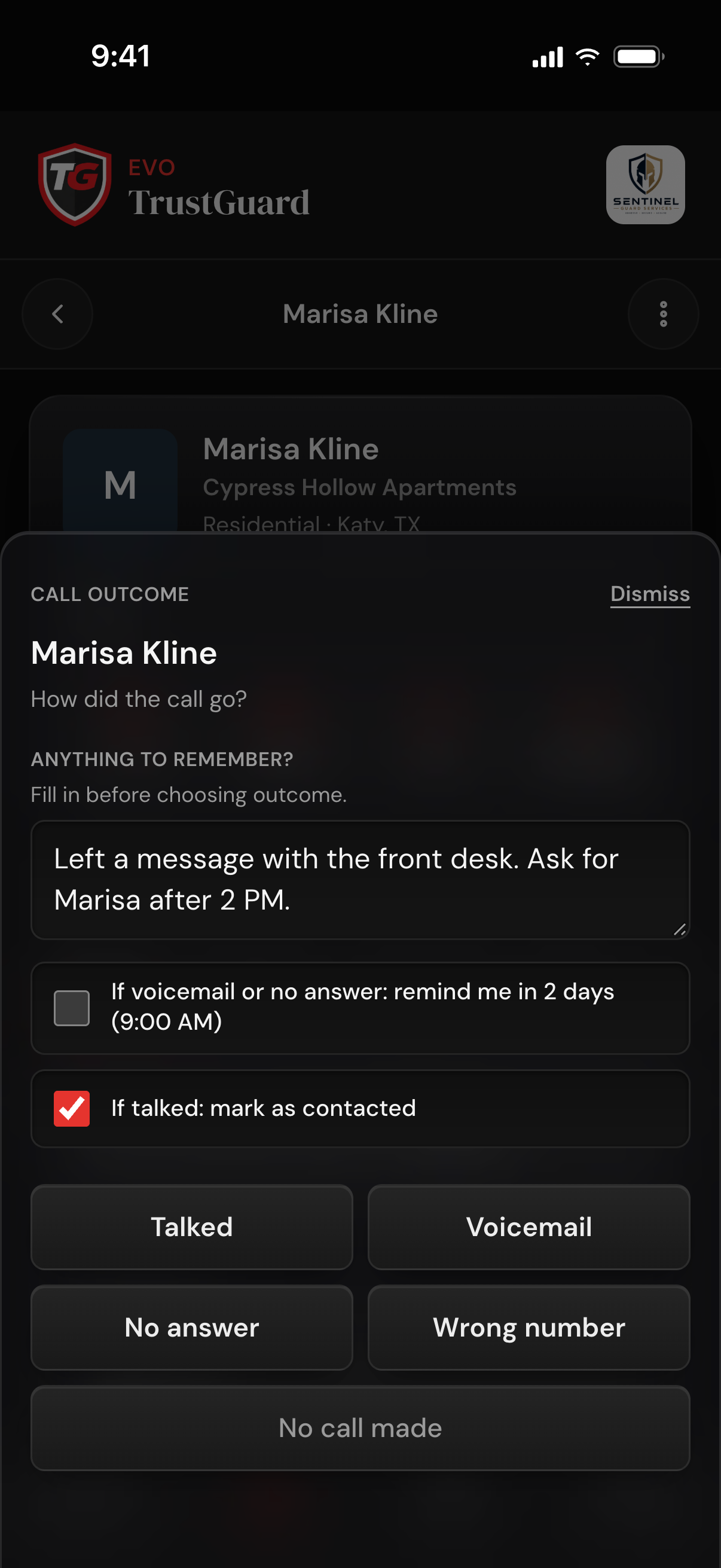
The call outcome sheet after a call: a typed note, a call-back reminder checkbox, a ticked mark-as-contacted box, and Talked, Voicemail, No answer, Wrong number and No call made buttons

Know where every lead stands.

Every lead carries a status: New, Contacted, Quote Sent, Contract Sent or Hired, and every change goes to Lead History with your name. Once a quote or contract goes out from TrustGuard (Business), the card shows a Quote sent or Contract sent pill. Notes show who wrote them and when. Reminders are tied to the lead, and with notifications turned on a push goes to the person who set one. Standby, Outreach and archive take a lead out of the working list without changing its status.
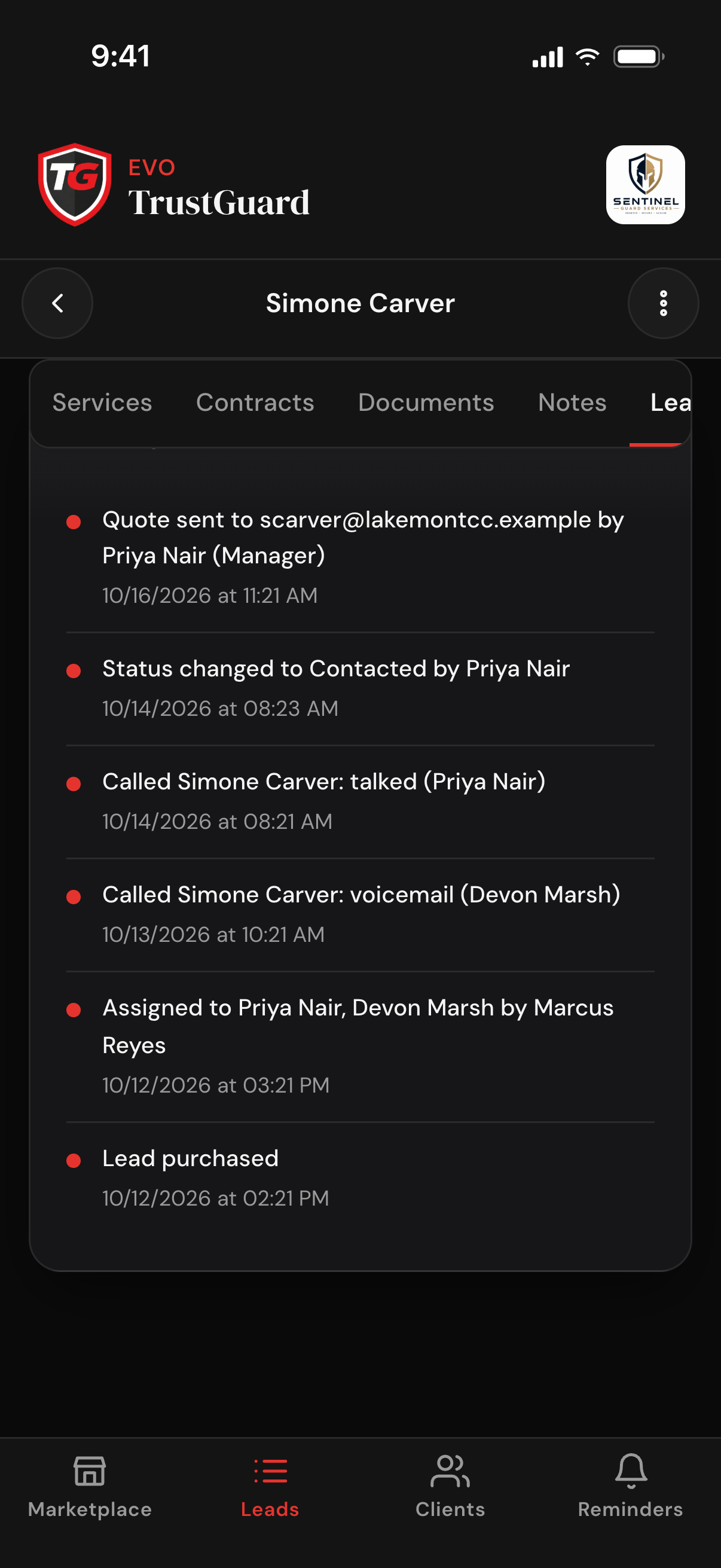
A lead's Lead History tab: the quote sent, a status change to Contacted, a talked call, a voicemail call, the assignment to two team members and the purchase, each with its date and time and, on all but the purchase, who did it

Quote from the lead and assign it.

Build the job once on the lead's Client Information Sheet: service type, armed or unarmed, officer count, schedule and rate. On TrustGuard Business the quote and the contract go out from the lead's Services tab, and when the client signs, the lead is marked Hired and becomes a client with those details and its first service filled in. Owners and managers on TrustGuard Business assign each lead to one or more team members.
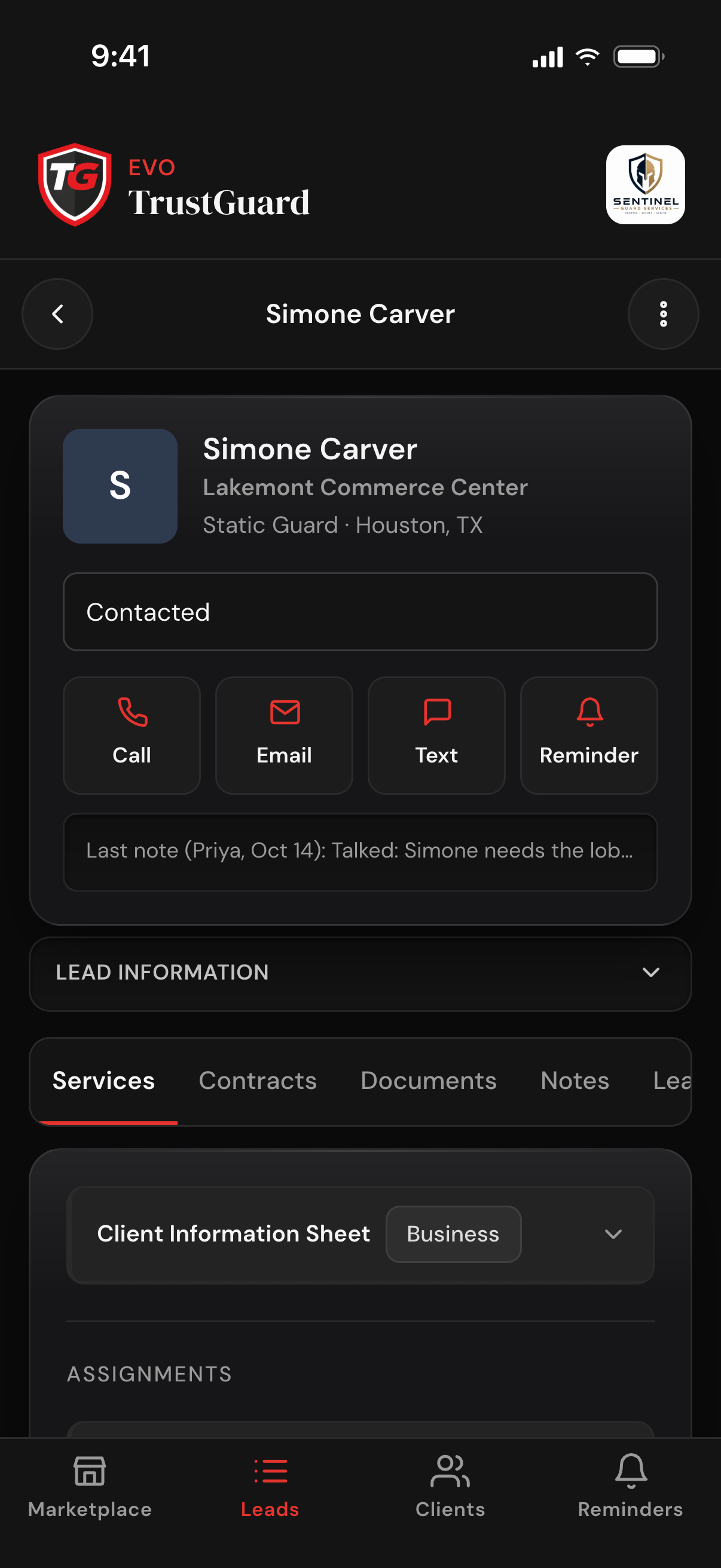
A lead's page with its status set to Contacted, Call, Email, Text and Reminder buttons, the last note with who wrote it, and the Services tab with the Client Information Sheet and Assignments
Lead management

Every lead, every source, one place.

Stop running your pipeline across spreadsheets, note apps and tools that don't talk to each other.

One format for every lead.

An Inbound Lead you buy, a referral you type in, an email thread you paste, a screenshot you upload: every one lands in My Leads as the same lead card, with the same fields, statuses and buttons.

No more pipeline scattered across tools.

Stop reconciling a generic CRM, a spreadsheet, an email folder, and a notebook. Work from a single list.

Built for guard, EP, and patrol companies specifically.

The lead card understands armed versus unarmed, officer count, days and shift times, rate, service type and the site address. Generic CRMs don't. Missing details show as To be confirmed, not blank rows.

Stop retyping leads from other sources.

Screenshot a lead from any marketplace or referral platform you already use, upload it, and AI fills in the lead card for you to review before it is saved. Populate from Lead then copies the contact and job details into the Client Information Sheet, so nothing is typed twice.

FAQ

Questions, answered

Is EVO TrustGuard a CRM?

Yes. TrustGuard is a CRM built only for guard, EP, and patrol companies. It tracks every lead from first call to signed contract, and on TrustGuard Business the quote and the contract are built from the lead's own Client Information Sheet, so nothing is retyped.

Can I bring in the leads I already have?

Yes. Tap Create Lead, then paste the text or upload up to 10 files (PDF, Word, text, or photos and screenshots). AI fills in the lead for you to check before it is saved. Each import makes one lead, private to your company.

Can I control which leads my reps see?

Yes, on TrustGuard Business. A rep without the see-all-records permission sees only the leads assigned to them. Owners and managers assign each lead to one or several people, someone added from the lead's Assigned To picker gets a push when their notifications are on, and every status change and assignment is written to Lead History.

What do I do with a lead that is not ready to buy yet?

Move it to Standby and pick a check-in date. It leaves your active list, you get a reminder at 9:00 AM that day, and when you tap Return to Active it comes back at the status it had.

Do I need the paid plan to track my leads?

No. My Leads, Create Lead with AI import, call, email and text, statuses, call outcomes, notes, reminders, Standby, Outreach and archive all work on the free TrustGuard Marketplace account. Quotes, contracts, documents, email from inside TrustGuard, team assignment and Signal Leads need TrustGuard Business, $199 a month, flat.

Ready when you are

The future of how security companies will operate starts here.

Spreadsheets, folders, generic CRMs, scattered tools, hours of retyping. That doesn't have to be how you run your business anymore. Join the platform that was built for you.

Get started
Month-to-month billing. Cancel anytime.