TEAM AND PERMISSIONS

Add your managers and reps, each with the access you set.

EVO TrustGuard is security company software with team roles and permissions for guard, EP, and patrol companies: invite your managers and reps, decide what each one can see and do, route new leads by state, and read an activity log of who did what.

Part of TrustGuard Business, $199 a month.

How it works

Invite, set access, assign, and check the log.

Five things the owner does, from the Team Members page and from any lead.

Invite your managers and reps.

Tap Invite, type a name and an email address, and send. The person gets an Accept Invitation link that works once and expires in 7 days, sets their own password, enters no card, and joins as a Rep. Until they accept, you can revoke the invite.
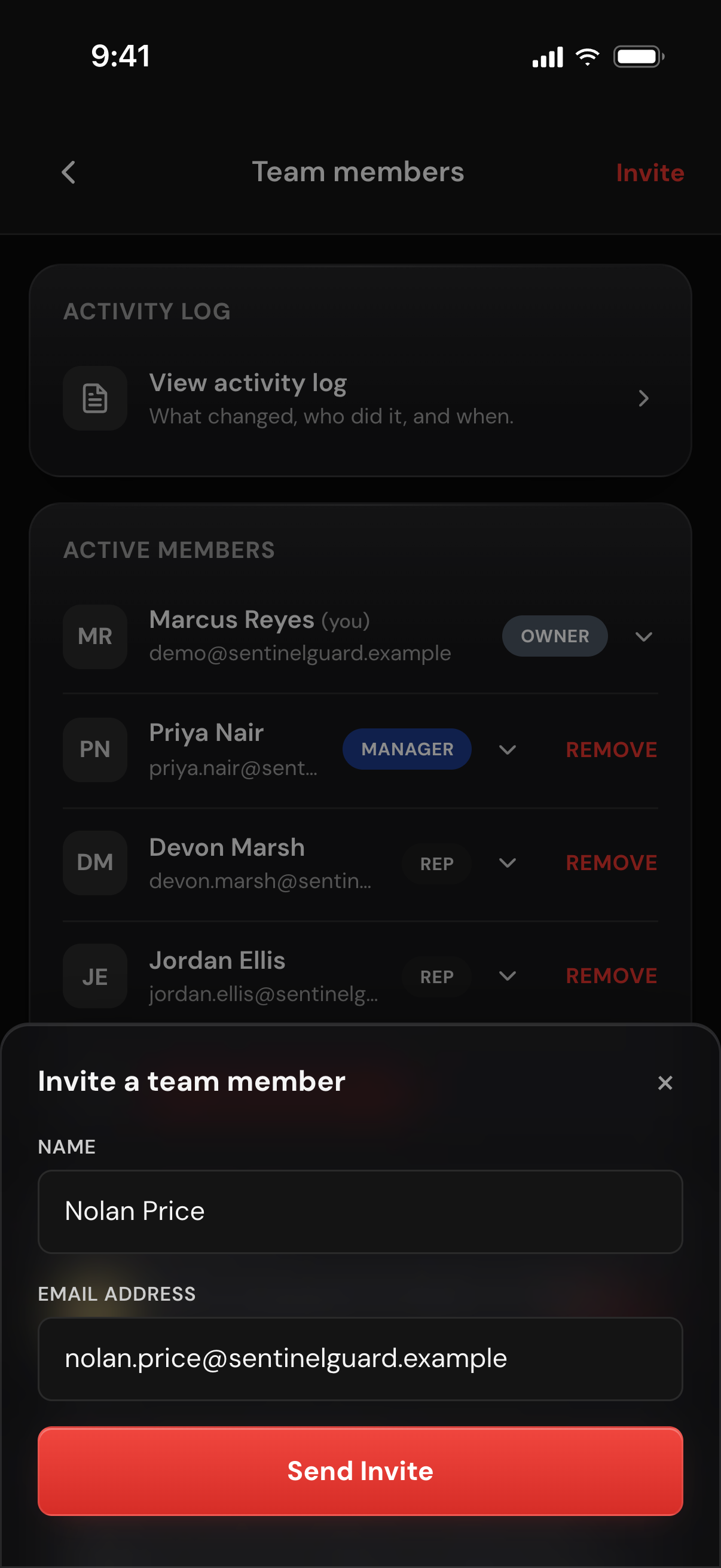
The Invite a team member sheet over the Team members list, with a new rep's name and email typed in and a Send Invite button

Set each person's role, permissions and states.

Tap a person's row and choose Manager or Rep. Managers pass every permission automatically. A rep has four switches you flip one by one: Can purchase credits, Can see all records, Can manage clients, Can send invoices. Then add the states that rep covers, or pick Nationwide.
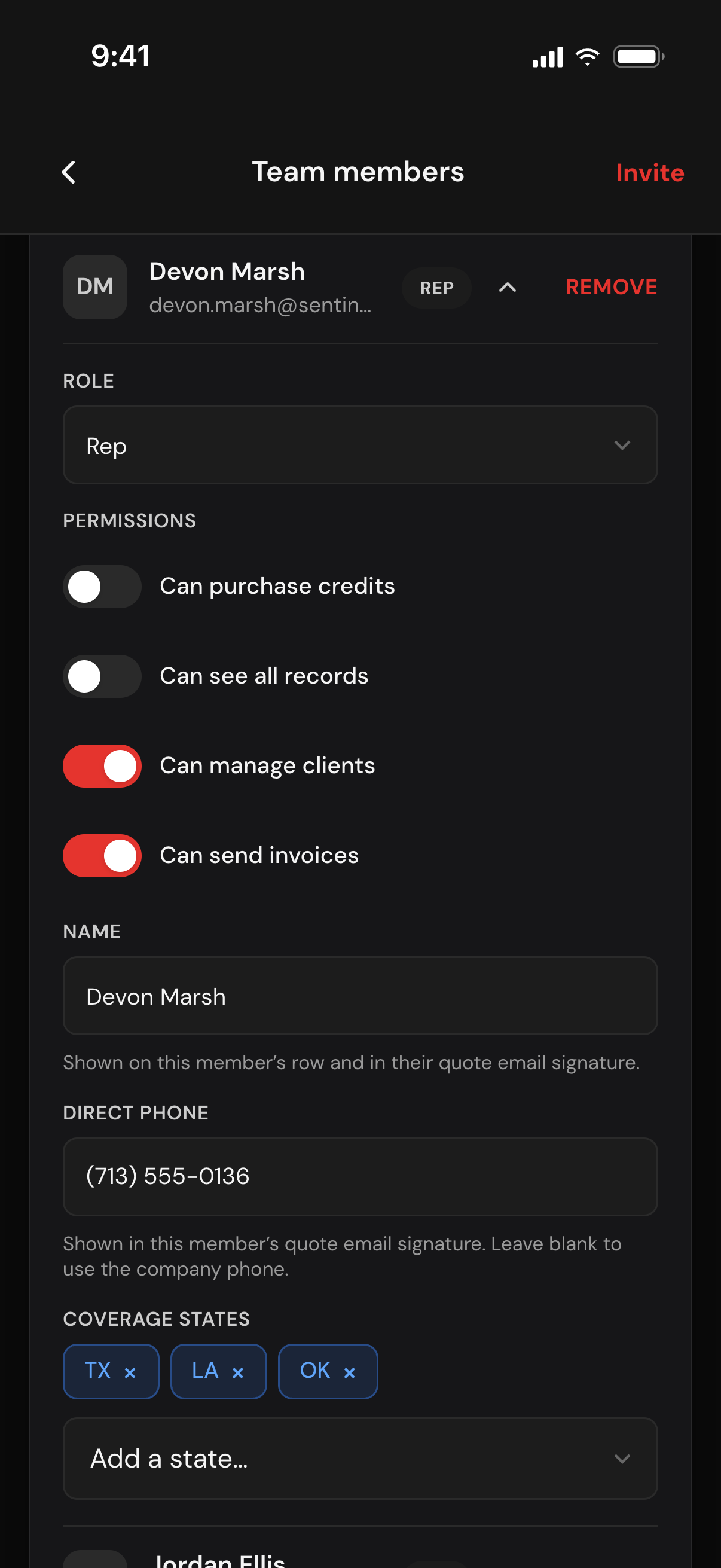
One rep's row opened: the Role set to Rep, four permission switches with Can manage clients and Can send invoices on, a direct phone, and coverage states TX, LA and OK

Assign the work, or let the states route it.

On a lead, tap Assigned To and tick one or several people. Everyone ticked sees it in My Leads, and anyone newly added gets a New lead assigned push when their notifications are on. Leave a new lead unpicked and it goes to the earliest-added active rep covering its state, or to you when no rep does.
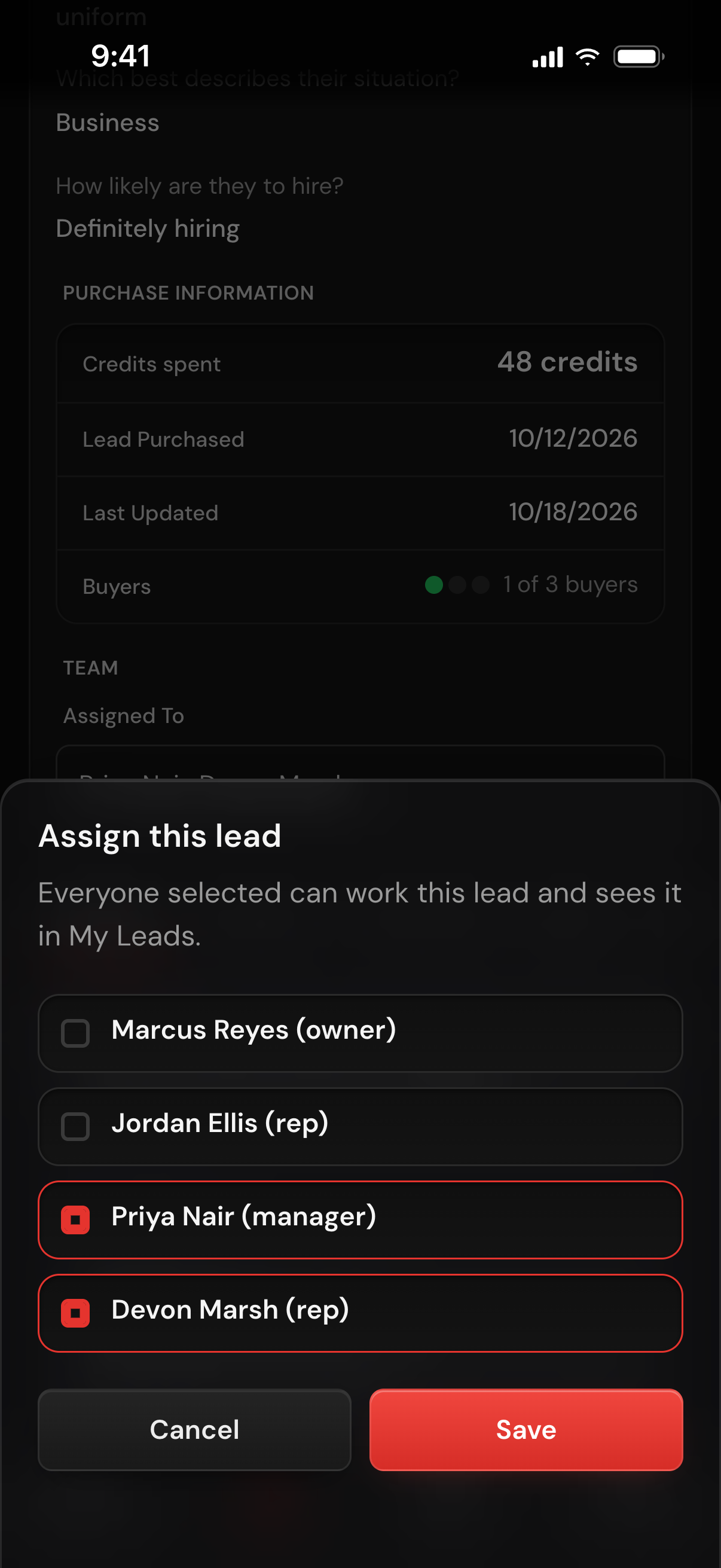
The Assign this lead picker on a lead: the owner and team listed with their roles, a manager and a rep ticked, and Cancel and Save buttons

Save the people who never log in.

Under Off-platform contacts, add a name, an email and an optional role such as Dispatch. These contacts get no login. They appear as ready-made recipients whenever anyone on your team sends a post order, documents, a quote or a contract.
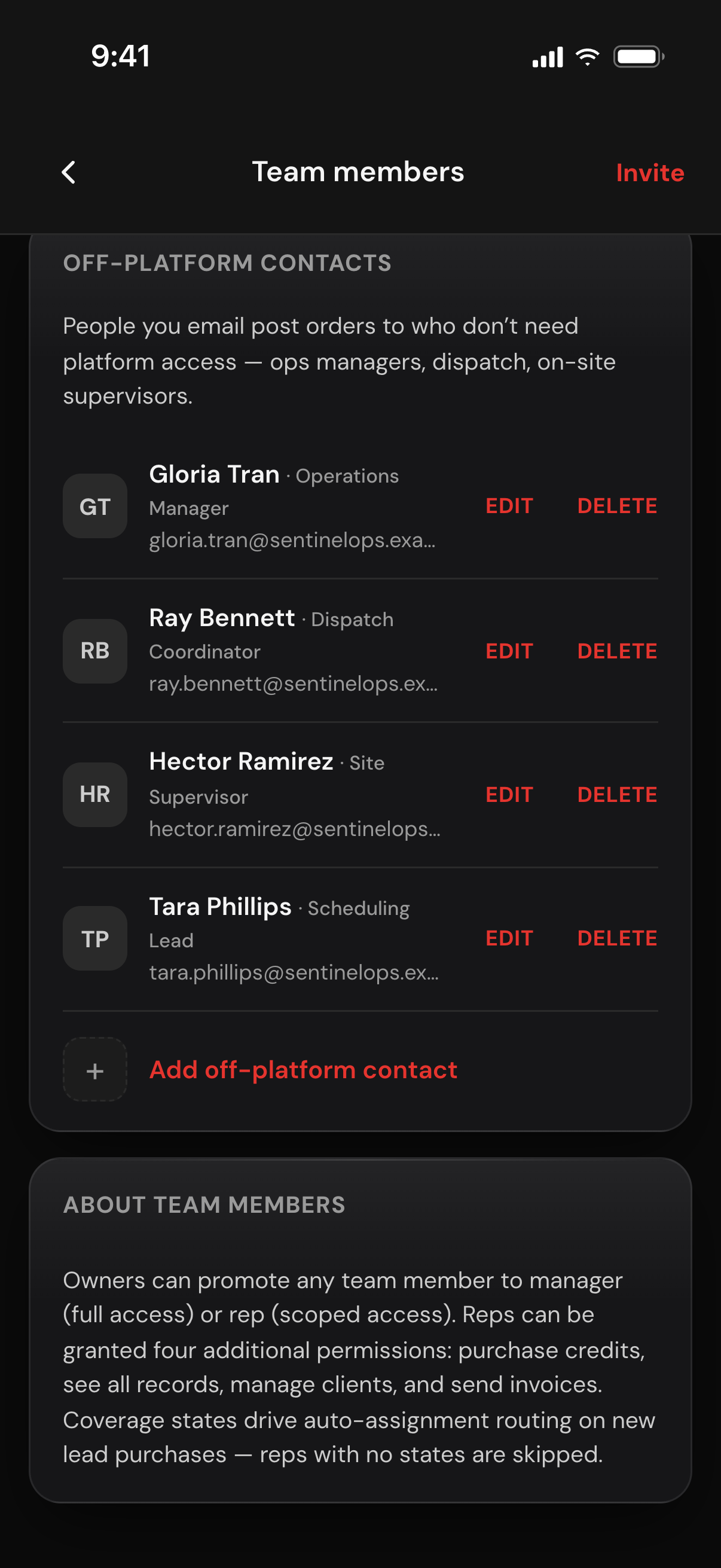
The Off-platform contacts list: four named contacts with role labels such as Dispatch Coordinator and Site Supervisor, each with Edit and Delete, and an Add off-platform contact link

Check the activity log.

Tap View activity log at the top of the Team Members page. Each entry shows what happened, which record, who did it and when; tap one to see what changed. Filter by person, action, record type and date.
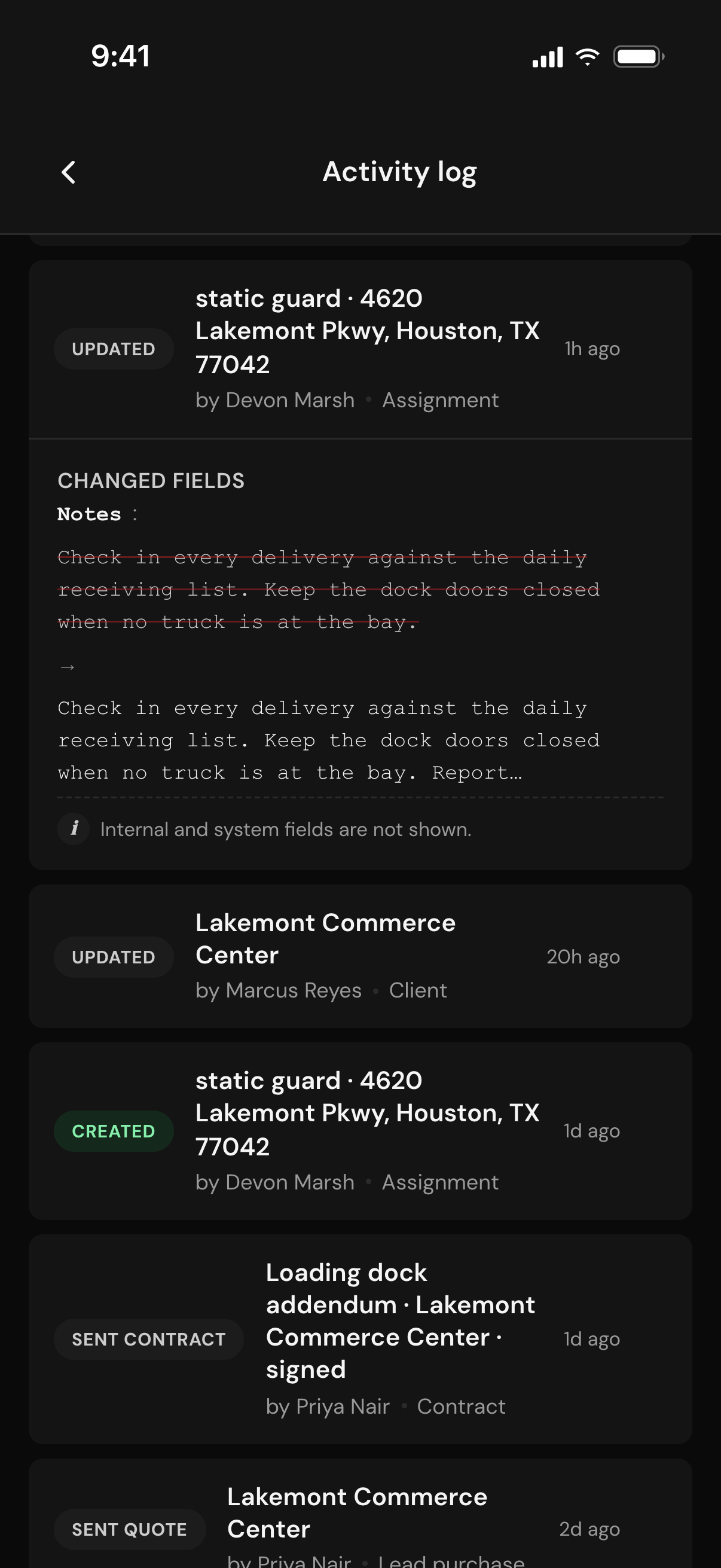
The Activity log: updated and created assignments, an updated client, a sent contract and a sent quote, each with who did it and when, and one entry opened to show the Notes field that changed
Team access

Set what each person can see and do, and know who did what.

A spreadsheet or one shared login gives everyone the same access and no record of who changed what. TrustGuard limits access by role and by assignment, keeps an activity log, and adds a Manager role for when you delegate.

Invite reps and managers by email.

Invite by name and email. The person accepts the emailed link, sets a password and joins as a Rep; promote them to Manager when you choose. No card, no plan of their own, no per-user fees.

Three roles and four switches you control.

Owner, Manager, Rep. A new rep starts with Can manage clients on and the other three off: see all records, send invoices, buy more credits on the company card. Move a manager to rep and all four reset to off.

Limit what reps see by assignment and by state.

With Can see all records off, a rep sees only the leads, clients, contracts and invoices assigned to them. Assignment is by hand, one or several people per lead, or by the states you give each rep.

An activity log of who did what.

It records a set list of actions: created, sent, status changed, reassigned, archived, deleted, call outcome, and role, permission and coverage changes, each with the person, the record and the time. Open to you and your managers.

FAQ

Questions, answered

How many people can I add, and does it cost extra?

TrustGuard Business lists the account holder plus 4 team members at one flat monthly price, $199, with no per-user fees. A team member needs no card and no plan of their own: they use the company's plan.

What is the difference between a manager and a rep?

A manager has full day-to-day access, can assign leads and can read the activity log. A rep works what they are given, with four switches you control: manage clients (on for a new rep), see all records, send invoices and purchase credits. Only you, the owner, can invite people, change roles, flip permissions or set coverage states.

Can a rep see my whole client list?

Not unless you allow it. A rep sees only the leads, clients, contracts and invoices assigned to them until you switch on Can see all records for that rep.

How do new leads get to the right person?

Give each rep their states. A new lead with nobody picked goes to the rep covering its state, otherwise to you. You or a manager can assign one or several people from the lead, and each person added there gets a push notification if their notifications are on.

What happens when someone leaves the company?

Tap Remove on their row and they lose access to your account. Their leads and clients stay with the company and show as unassigned until you give them to someone else. Their past entries stay in the activity log, shown as Former team member.

Ready when you are

The future of how security companies will operate starts here.

Spreadsheets, folders, generic CRMs, scattered tools, hours of retyping. That doesn't have to be how you run your business anymore. Join the platform that was built for you.

Get started
Month-to-month billing. Cancel anytime.